All-in-one Android launcher with OS-style controls
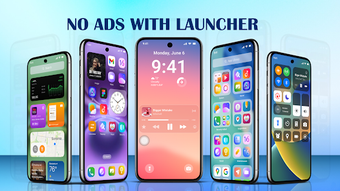
Hydra Launcher & Themes, from Hydra Global Ltd., replaces the default Android launcher to provide an OS-style, customizable home experience. The app bundles a custom Control Center, Notification Center, and Lock Screen while adding a Smart Launcher and instant search for apps. It also includes a library of HD and 4K wallpapers and multiple control-center designs. The app targets Android users who want deep visual control and a single package for interface customization.
How the app reshapes the home screen and interaction model
The app replaces the system launcher and integrates OS-like panels, so the home screen behaves like a combined workspace and control surface. Smart Launcher groups apps into categories and offers an instant search bar for quick access; the custom Lock Screen supports integrated widgets and a camera shortcut. These elements change how users launch apps and access toggles by consolidating them into one interface rather than switching between system menus.
How much control users get over appearance and layout
Customization reaches layout, quick toggles, and wallpaper quality. The Control Center supplies multiple modern designs and quick-access toggles for Wi-Fi, Bluetooth, and flashlight. Users can adjust launcher layouts and assign HD or 4K wallpapers from the built-in library. The app’s notification styling and lock-screen layout options let users tailor alert appearance and widget placement beyond default launcher capabilities.
Does it affect device performance or background behavior
User feedback highlights smooth operation despite added features, with a reported 4.7 average rating that cites smooth performance. The app runs as a replacement launcher, so it remains active in the background to manage notifications and the control center. Expect persistent background presence when those integrations are enabled, which aligns with its role as a full-interface replacement rather than a transient visual tweak.
Is setup straightforward and what permissions are required
Installation requires explicit permissions for full functionality. The app asks for Notification Access and MANAGE_EXTERNAL_STORAGE for the universal file search, plus Camera permission to launch the camera from the custom Lock Screen. Those permissions enable integrated features but require users to accept broader access than a simple wallpaper app, so setup involves granting multiple system-level permissions.
Who should install it and a practical permission tip
Hydra Launcher & Themes is a capable option for Android users who want one app to control home, lock-screen, and quick-toggle behavior; expect to grant Notification and storage permissions to unlock full features. Users who prefer minimal permission footprints should review the MANAGE_EXTERNAL_STORAGE and Camera grants before enabling those modules. The app suits people comfortable with replacing the default launcher for deeper interface control.